
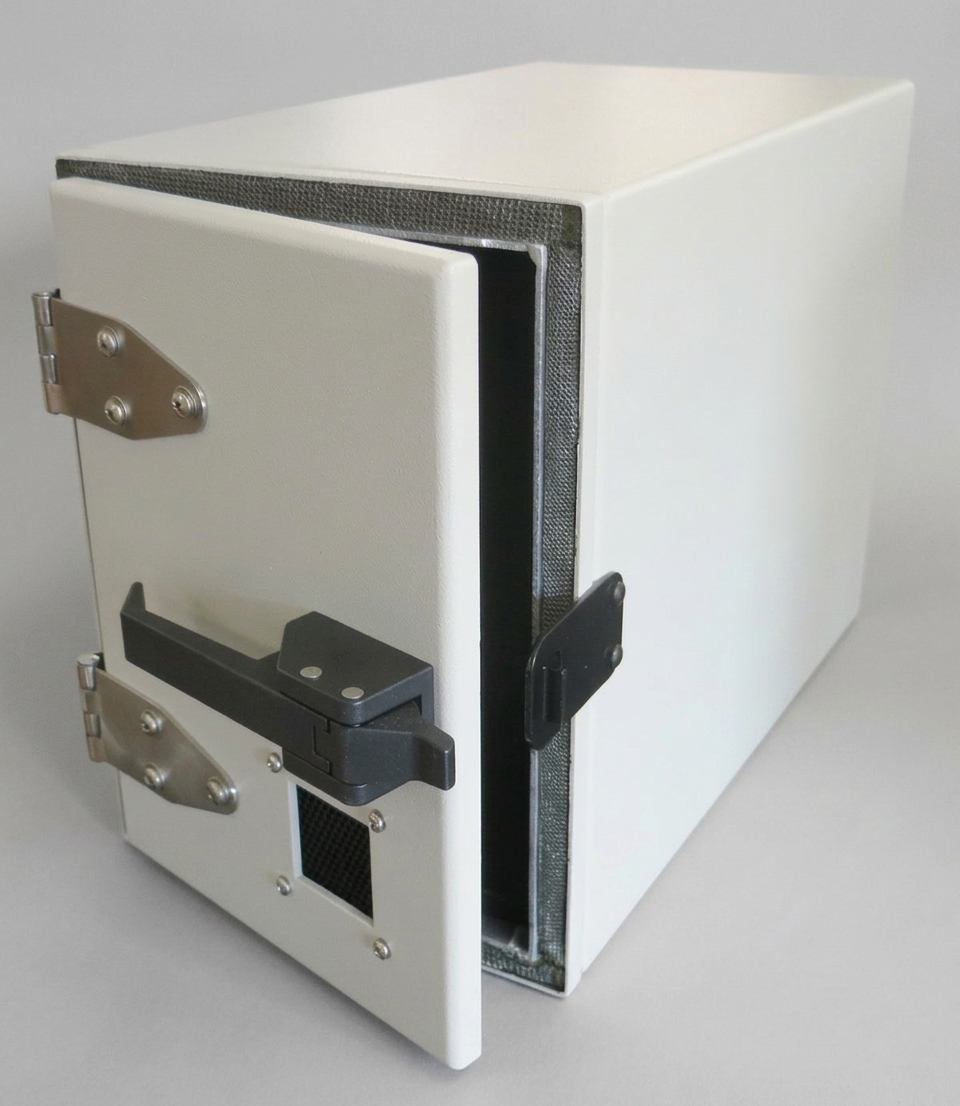
802.11a/b/g RF Shielded Test Enclosure — Benchtop — JRE 0814-A
Pre-configured JRE 0814 with dual filtered DB9s, filtered power, 2 SMA bulkheads, and two 2.4–5.8 GHz whip antennas.
JRE 0814-A specifications
- Inside dimensions
- 9.5" H x 6.5" W x 12.5" D (240 x 165 x 320 mm)
- Outside dimensions
- 11" H x 8" W x 14" D (280 x 205 x 355 mm)
- Isolation
- −100 dB DC to 1 GHz, −95 dB to 3 GHz, −85 dB to 6 GHz
- Weight
- 12 lbs (5.5 kg)
- Shipping Weight
- 14 lbs (6.4 kg)
- Shipping Dimensions
- 18" x 16" x 13" (460 x 410 x 330 mm)
- RF Absorbing Foam
- 3/4" (19 mm) thick, 90°C temp rating, UL 94V-0 flammability
- RF Feedthru
- 2 each of SMA female bulkheads
- RF Filtered Data Connectors
- Dual DB9's, one with 100 pF filtering, one with 1000 pF filtering
- Adapter
- DB9 to RJ45 adapter
- Power Connection
- 4 terminal barrier strip, 2500 pF filtering, barrier strip cover included
- Whip Antennas
- 2 each of 2.4 - 5.8 GHz whips
- Universal I/O Plate
- 7" x 7" (180 x 180 mm), JRE Test "C" size
- Frequency Range
- Up to 18 GHz
JRE 0814-A overview
A test defined around serial data, RF paths, and filtered power can skip the blank-plate step with this preconfigured upright enclosure. Its installed interface set is built for standing wireless devices, with front access that keeps loading and cable placement straightforward. I would start by matching those installed connections to the bench.
- 9.5" H x 6.5" W x 12.5" D (240 x 165 x 320 mm) interior for tall DUTs.
- −100 dB isolation from DC to 1 GHz, −95 dB to 3 GHz, and −85 dB to 6 GHz.
- Specified frequency range reaches up to 18 GHz.
- Dual DB9s use 100 pF and 1000 pF filtering; a DB9-to-RJ45 adapter is included.
- 2 SMA female bulkheads pair with 2 whips covering 2.4 - 5.8 GHz.
- 4 terminal barrier strip uses 2500 pF filtering, with its cover included.
- Field-changeable C-size plate measures 7" x 7" (180 x 180 mm).
- $1,705.00 and in stock as a preconfigured enclosure.
This version saves plate-definition work only when its filtered data, power, and RF paths line up with the test plan. Shielded honeycomb vents are standard, and an optional fan can support a warmer DUT. The installed interface map should settle the choice before the upright format does.
Go deeper
- How to Select and Configure an RF Shielded Test Enclosure A practical engineer's guide to sizing an RF test enclosure, configuring I/O plates, choosing filtered data interfaces, power, thermal, and antennas.
- Keeping Your Cool: Heat, Vents, Fans and Airflow in an RF Shielded Test Enclosure Why RF shielded chambers heat up, how to measure real device wattage instead of the label, and how much airflow it takes to hold your temperature rise.
- Mounting Devices Inside an RF Shielded Test Enclosure How to hold your DUT inside a JRE chamber for repeatable RF tests: the removable ABS floor, why plastic not metal, antenna placement and wall drilling.
Enclosures nearest the JRE 0814-A


Tell us what connections your device needs.
Tell us what connections you need to your device under test — USB, Ethernet, RS-232, RF connectors, etc. We'll spec it out with you. No cart, no checkout: you send an inquiry and we quote it.
Ask an Engineer